This report was done for course Tunkeutumistestaus ict4tn027-3007 organized by Tero Karvinen. The course information and assignment descriptions in finnish can be found at https://terokarvinen.com/2021/penetration-testing-course-2022-spring/.
a) SELECT * FROM student. Solve 0 SELECT basics, 2 SELECT from World parts 1-4 in SQLZoo.
Environments:
All the virtual machines were run in VirtualBox version 6.1.32.
Task b was done by using WebGoat version 8.2.2 and Kali Linux version 2022.1 with latest updates installed on 06.04.2022 at 12:30.
For tasks c, d, e, f, g, h, i ,j and k I used Kali Linux version 2022.1 with latest updates installed on 07.04.2022 at 11:00. The used Metasploitable2 image was metasploitable-linux-2.0.0.
0 SELECT basics
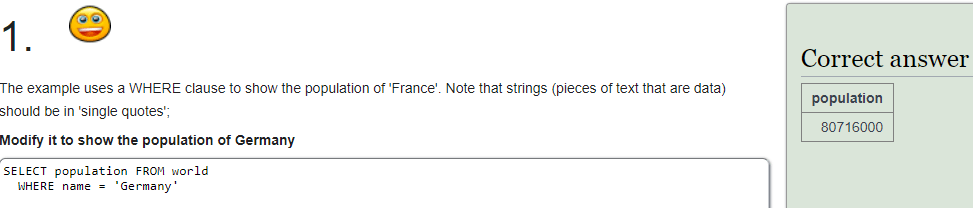
1: I changed “France” to “Germany” in the SQL query.
2: I replaced the clause “IN (‘Brazil’, ‘Russia’, ‘India’, ‘China’);” with “IN (‘Sweden’, ‘Norway’, ‘Denmark’);” for successful completion.

3: I replaced the values in the “BETWEEN” clause with the correct ones.

2 SELECT from World
1: In the first task nothing was needed to change, just running the default query provided was enough.

2: I changed the WHERE clause operand to “is greater than” (>) and replaced the value with two hundred million.

3: I wrote a query that selected the name and calculated the GDP per capita. Then the result was filtered with populations that are equal to or greater than 200000000.

4: This task was similar to the previous one. First I selected the country names and divided their populations into millions. One subquery in the select clause where the population was divided into millions and a filter that only included countries from the South America continent.

b) Solve WebGoat: A1 Injection (intro).
First I disabled all internet adapters on my Kali machine and confirmed this by running command “ping 8.8.8.8”, which is the Google DNS server IP address. The ping did not get a response and exited with error “network unreachable”. I performed another test with “sudo apt-get update” command, which also exited with a resolving error.
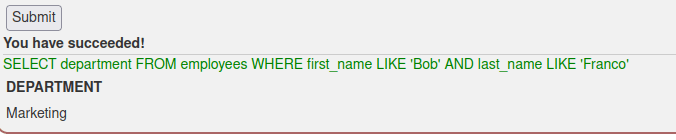
Now that the machine had no interent connectivity, I launched WebGoat. The first task was to retrieve data from table “employees”. The wanted data was the department of an employee named Bob Franco. I ran query “SELECT department FROM employees WHERE first_name LIKE ‘Bob’ AND last_name LIKE ‘Franco'” to retrieve the correct data.
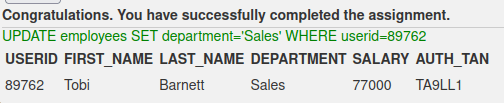
In the next task the database table “employees” had to be updated with new information. I used https://www.w3schools.com/sql/sql_update.asp as a resource to refresh my memory on the syntax of the query. I had to check the employee id from the previous task, as there was no way to see it in the current task. Using the employee’s name to update the record could have been an option, but using names is not as reliable as using the userid, because many people can have the same name but user id can belong to only one person. The query I used was “UPDATE employees SET department=’Sales’ WHERE userid=89762”.
Third task was a quick one, as I remembered the query to alter tables without any research. A slight trial and error happened though, as I first put quotation marks around column name phone. The second try was correct and is displayed below.

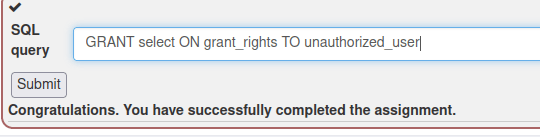
Fourth task was a bit more difficult and the instruction was slightly unclear in my opinion. It was not clear which rights the user was supposed to be assigned, so I gave the user “unauthorized_user” select rights to table “grant_rights”. I used https://www.geeksforgeeks.org/difference-between-grant-and-revoke/ as my source to figure out the syntax.
Fifth task included performing a basic SQL injection to return all the rows from a table. The query string was given as a hint on how to solve the assignment. The key to success was to understand how the 1=1 could be used at the end of the query to return all the rows since it is always true. Through some brainwork and trial and error I was able to figure out the correct inputs to close all the apostrophes and use the “or” clause.
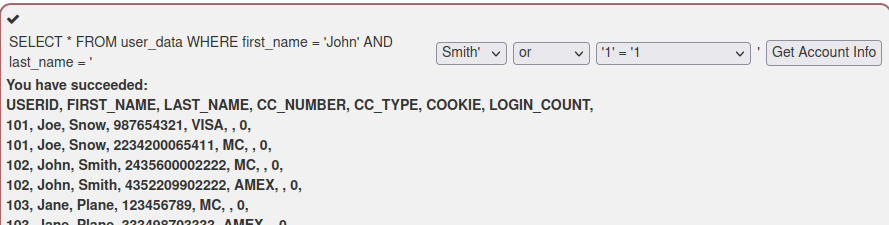
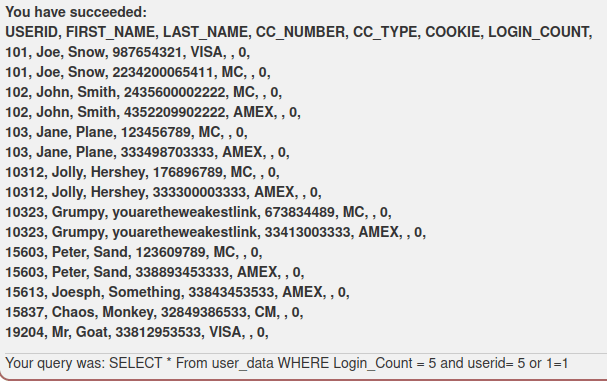
Sixth task was quite quick, as the query was shown at the bottom of the answer box after every run. Just by looking at the query string it was quite clear that the vulnerable field was the User_id field. The login count could be set to any numeric value and the User_id could be any number with “or 1=1” added at the end of the input.
The seventh task provided a challenge to me as the query was not available at the bottom of the screen after running it. I first ran the query with the provided values “Smith” and “3SL99A” to test the functionality. It returned exactly one row of data, as expected.
Next I paid attention to the order of the apostrophes in the query. Through some trial and error I managed to figure out the correct way to insert the OR 1=1 in to the query. This task took me so far the longest time to figure out, almost 30 minutes.
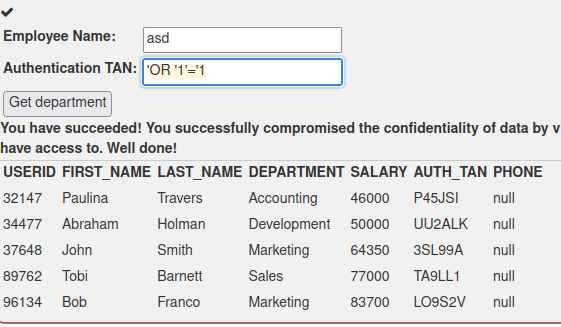
Task eight required performing a UPDATE operation on the data. No data was provided on how the query string was formed. I ran the same query as in the previous task and got the same result, which indicates that the query string could have been the same.
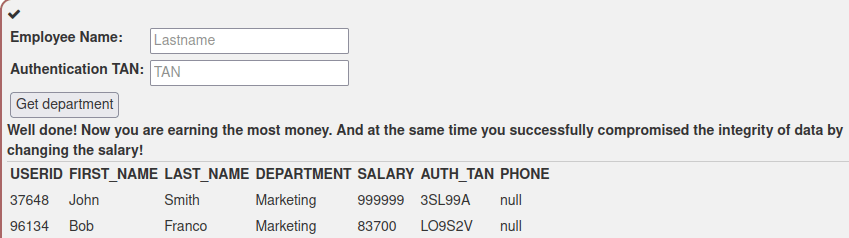
To chain the second SQL query into the first one, “;” is used to end the first query. So I took inspiration from the previous task and started my malicious input with an apostrophe. Then I added “;” to chain the second query. I inserted the query “UPDATE employees SET SALARY=999999 WHERE AUTH_TAN LIKE ‘3SL99A’ “. This did not work, as the result was a malformed string.
I analysed why the string was malformed, and decided to remove the last apostrophe as that seemed to cause the problem. Then the query was then successful and the salary was changed. The final query was
';UPDATE employees SET SALARY=999999 WHERE AUTH_TAN LIKE '3SL99A
Last task was about dropping a table. I ran again the query ‘or ‘1’=’1 to see if the query string works the same as in the previous tasks. The result was positive, as all the rows were returned.
I tried running the query with the same format as in the previous task, but it failed as there was a problem with wildcard character %. This gave me an idea of how the query string actually works. To test my theory, I ran two legit queries: first with “a” and then with “q”. Query with value “a” returned every entry containing the letter “a” in the “action” field, while “q” produced no matches. Most likely the query string contained clause “WHERE action LIKE ‘%” + action + “%'”, which was used to return any matches of the given input. To avoid the wildcards, I realized that I must insert one “%” in the first query before running the second query. So the next query I ran was
%'; DROP TABLE access_log;
But the query exited with error “unknown token:”. Something was still off. At this point I had to look through the hints, and was able to find the solution. Second last of the hints actually proved my theory of the query string format correct. The last hint said to comment out rest of the query after dropping the table, so that was what I did. The query ran correct and I completed the task. The final query I ran was
%'; DROP TABLE access_log;--

c) Punching bag. Install Metasploitable 2 in the same network with Kali. Confirm that vulnerable Metasploitable 2 is not visible to the internet.
First I had to set up an isolated network that is not visible to the internet. VirtualBox has a convenient feature to create a host-only network adapter without too much of a hassle, instructions and more info at https://www.virtualbox.org/manual/ch06.html. First I tried this on the Kali machine I had existing already. I navigated in VirtualBox to the Kali machine settings -> Network -> Adapter -> Enable -> Attached to: “Host-only adapter”. I had another network interface existing which I use for internet connectivity, so I disabled that. I started the Kali machine and ran command “ping 8.8.8.8”. No response was received, as the command exited with “network unreachable” error.

Next I downloaded Metasploitable 2 from https://information.rapid7.com/download-metasploitable-2017.html. The package included a .vmdk file, which is a virtual machine disc format file. I created a new virtual 64-bit Debian machine in VirtualBox to install Metasploitable on. Then I configured the network adapter settings so that the machine uses the same “host-only” adapter as my Kali was using. Before starting the machine, I added the provided image file as the machine hard drive. The first launch was successful, the machine booted up as intended. I logged in with username “msfadmin” and password “msfadmin”.
The next step was to confirm that the machine is unable to reach the internet. I tested the connection with the “ping 8.8.8.8” command. The command exited with error “Network is unreachable”. I ran another command “ping 1.1.1.1” (CloudFlare DNS), which resulted in the same error.

I ran “ifconfig” command on both machines. They seemed to be in the same, isolated network as the IP addresses were in the private 192.168.x.x range. I ran Nmap on the network to discover hosts. I used command “nmap -sn 192.168.0.0/16” to enumerate through the address space 192.168.x.x. The result was as expected, as the there were two hosts found. The machines were isolated from the internet and they were communicating together.

d) Recorded. Record all the commands and the outputs from a task.
I recorded my terminal from Kali while doing the assignment “e” to keep the log file short. Command I used to record the terminal was “script -fa kaliLog”. Apparently the “f” parameter moves every command and output immediately to the file after it has been run? The “a” parameter will append the recording to a file.
Script started on 2022-04-07 07:08:06-04:00 [TERM="xterm-256color" TTY="/dev/pts/0" COLUMNS="123" LINES="34"]
^[[?2004h^[]0;esa@kali: ~^G^[[;32m┌──(^[[1;34mesa㉿kali^[[;32m)-[^[[0;1m~^[[;32m]^M
^[[;32m└─^[[1;34m$^[[0m ping 8.8.8.8
^[[?2004l^Mping: connect: Network is unreachable

^[[?2004h^[]0;esa@kali: ~^G^[[;32m┌──(^[[1;34mesa㉿kali^[[;32m)-[^[[0;1m~^[[;32m]^M
^[[;32m└─^[[1;34m$^[[0m exit
^[[?2004l^Mexit

Script done on 2022-04-07 07:08:12-04:00 [COMMAND_EXIT_CODE="2"]
e) Cannot hear you! Before you start the scanning, make sure Kali is not able to access internet. Command ‘ping 8.8.8.8’ should result in “Network is unreachable”.
I had disabled the internet adapter from my Kali and enabled the “host-only” adapter. I ran the command and the result was the expected error.

f) Find Metasploitable 2. Check first that the IP addresses are credible (ipcalc 10.0.0.1/23). Then do a ping sweep (nmap -sn). Analyze the results, explain what is what in the output. What can you reason of different machines?
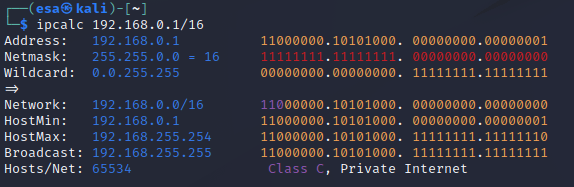
I used “ipcalc 192.168.0.1/16” command to print information about the address space of the network I was using. I used different address space than what was in the assignment description, hence the different ip addresses. As can be seen, the address space where my machines are located is meant for private use. The IP addresses make sense for a network that is not supposed to be visible to the internet. A note here though, not all addresses in the 192.0.0.0/8 space are reserved for private use. Only the 192.168.0.0/16 space is not publicly routable. All addresses beginning with 10 are reserved for private use, which is a safer choice to use if someone wants to minimize the possibility of accidentally accessing the global internet. Source: https://www.arin.net/reference/research/statistics/address_filters/
I ran a ping sweep on the network with command “nmap -sn 192.168.0.0/16”. This enumerated the whole private address space.
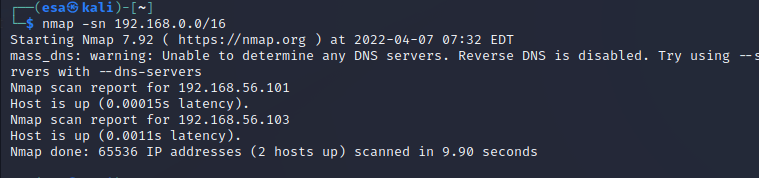
First the output displays the nmap version, starting date and time of the scan. After that the results are displayed. In this scan, two hosts were discovered. The information about ports is not included as the “-sn” parameter disables the port scan. The scan outputs the addresses that responded to the ping command. In this case the addresses were 192.168.56.101 and 192.168.56.103. The latency is displayed and the output ends with a summary of how many hosts were scanned, how many are up and how long the scan took.
An interesting information the scan returned, on top of the IP addresses, is the latency. That could be used possibly to determine which one of the hosts is the remote machine. I calculated 0.0011/0.00015=7,3333…, which indicates that one of the machines took roughly 7.3 times more time to respond. This is not a reliable way to determine which machine is which, but gives a slight hint about it as remote hosts usually have bigger latency than local hosts. I ran the command multiple times and the result was repeated every time with the latency being always 7-10 times more on the .103 ending IP address.
g) Kilo. Port scan 1000 most common ports from the found machines. Explain and analyze the results. Which of the machines could be Metasploitable 2?
First I performed a ping test on my Kali to confirm that it is still unable to access the internet with command “ping 8.8.8.8”. The result was the “network unreachable” error. Then I proceeded to perform the scan. The default scan of Nmap scans automatically the 1000 most common ports, so no parameters are needed. I scanned the hosts with commands “nmap 192.168.56.101” and “nmap 192.168.56.103”.
The first scan resulted in no results, as all the ports were “in ignored states”.

The second scan provided more interesting results. Due to the massive amount of open vulnerable ports and services, this must be the Metasploitable machine.
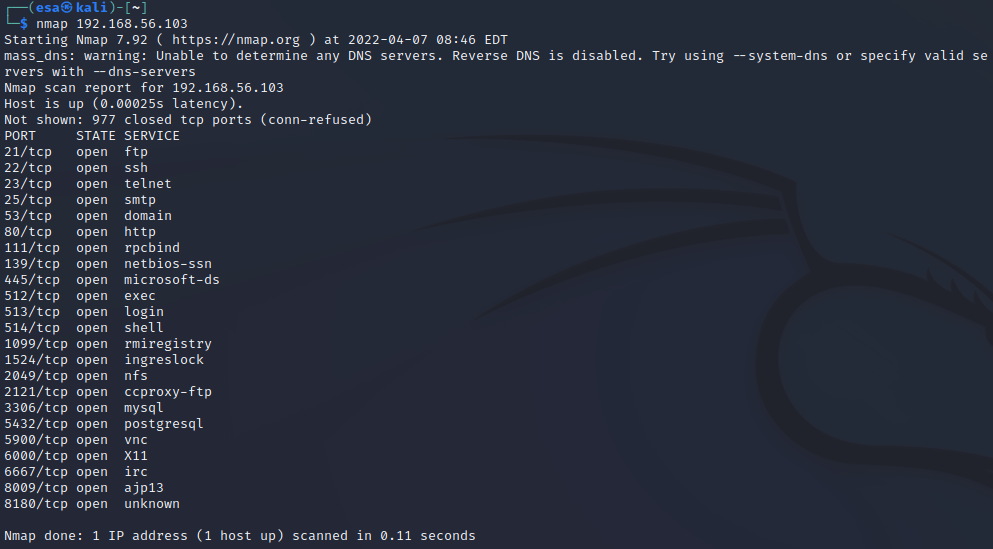
h) Port scan Metasploitable 2 in detail. Explain and analyze the results. Explain each port, which service it is running/what it is meant for, is it normally visible to internet and is it modern. You can also determine if the version has been updated.
I used “sudo nmap -sV 192.168.56.103” to scan the target machine in more detail. The output included a lot more information than the regular scan. This command scans the open ports and performs a version scan for the services running on them. https://nmap.org/book/man-version-detection.html is a great source for more in-detail information about how the tool works.
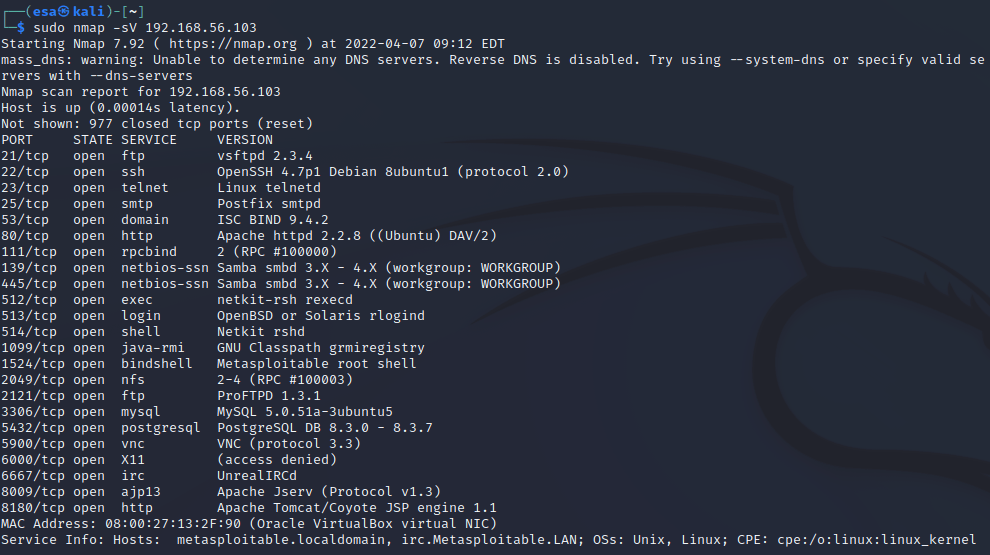
Port 21 was running ftp service using vsftpd version 2.3.4. Ftp is used for file transfer between computers over the internet. Vsftpd claims to be secure client, can be exposed to internet? The version is outdated, as the latest version is 3.0.5. Still relevant service. Source: https://security.appspot.com/vsftpd.html.
Port 22 was running SSH with OpenSSH 4.7p1. SSH is used to establish remote connections to the server via SSH client. It is considered a safe service, and can be exposed to the internet. The version of OpenSSH on this machine is very outdated. Latest version is 8.9, version 4.7 was released in 2007. Widely used today. Source: https://www.openssh.com/releasenotes.html
Port 23 was running Telnet service telnetd. It is the default telnet daemon for Linux. The use of Telnet is rare, as SSH has replaced it almost completely. Can be exposed to internet, even though it is very outdated and has no encryption. Technically a predecessor for SSH. Not used a lot these days.
Port 25 was running smtp service, which is the standard protocol for email transmission. It is using Postfix smtpd client, which does not specify the version. Has to be exposed to the internet for the service to work. Used widely. Source: http://www.postfix.org/smtpd.8.html.
Port 53 was running domain service. ISC Bind is an open-source software capable of running a DNS server developed by ISC organization. Can and should be exposed to internet. Version is outdated, as the latest version is 9.18.x. 9.4.1 was released in 2007. One of the most popular softwares for DNS servers. Source: https://downloads.isc.org/isc/bind9/
Port 80 was running the http service, in other words the web service. The version of Apache is very outdated, as the version 2.2.x has reached the end-of-life state. World’s most popular server software. The latest version is 2.4.53. Source: https://httpd.apache.org/
Port 111 was running the rpcbind service. It is a service for remote procedure calls. I am a bit confused about what it does, apparently something to do with distributed systems and translating RPC calls to universal addresses? I need more information about this.
Ports 139 and 445 were running the same service, netbios with samba. Samba is “the standard Windows interoperability suite of programs for Linux and Unix.” (https://www.samba.org/). The ports are “139 (used for SMB over NetBIOS over TCP) and port 445 (used for plain SMB over TCP).” (https://www.samba.org/samba/docs/current/man-html/smbd.8.html). It is hard to say more about the version, as the latest version is 4.16 and the service, based on the output, supports versions between 3.x and 4.x.
Port 512 was running the netkit-rsh rexecd service. Netkit-rsh is the client for remote shells (https://packages.debian.org/source/sid/netkit-rsh) and execd seems to be some sort of remote execution service that uses usernames and passwords for login. (https://linux.die.net/man/8/rexecd). No information about the version. I assume can be exposed to internet.
Port 513 was running the login service for OpenBSD and Oracle Solaris. They are unix based operating systems. Rlogind is a the server for rlogin program (https://linux.die.net/man/8/rlogind). Rlogin can be used for starting a terminal session on a remote host (https://linux.die.net/man/1/rlogin). No version information. Since it is used as a remote login service, I assume it is safe to expose to internet.
Port 514 was running a shell service and netkit rshd. It is the server for rsh service (same as running on port 512) and “provides remote execution facilities with authentication based on privileged port numbers from trusted hosts”. No version information. Should not be exposed to internet? I guess the login service can be exposed but the server not? Source: https://linux.die.net/man/8/rshd
Port 1099 was running java rmi service. The service allows “an object to invoke methods on an object running in another JVM”, so it is related to distributed systems. No service version information is provided. This seems like a misconfiguration issue? I would not leave a service like this open to internet. Source: https://www.javatpoint.com/RMI
Port 1524 was running bindshell with Metasploitable root shell. Bindshell allows the use of a shell in the target machine through an open port. The shell is a Metasploitable shell, which in a way is the latest version of the program. In a normal situation, this port should not be open to the internet. Source: https://www.geeksforgeeks.org/difference-between-bind-shell-and-reverse-shell/
Port 2049 was running the nfs service. It is used to mount disk partitions to remote machines as if they were local disks. After reading through the manual introduction and security pages, seems like a very poor option to use public internet for connections. I would not allow this service to be visible in the public internet. Source: http://nfs.sourceforge.net/nfs-howto/ar01s02.html.
Port 2121 was running another FTP service called ProFTPD version 1.3.1. The service is a FTP service that was designed to be secure and have less administration than Apache. The 1.3.1 version seems to be outdated, as the latest version is 1.3.7. Should be safe to expose to internet, trusted by multiple big sites. Still a relevant service. Source: http://www.proftpd.org/goals.html.
Port 3306 was running a mqsql service. MySql version 5.0.51 seems very outdated, as the documentation is not even available anymore on the official site. Latest version is 8.0.28. Should not be exposed to internet. Popular option to run a database. Source: https://dev.mysql.com/doc/.
Port 5432 was running another database, postgresql with version 8.3.0-8.3.7. Versions starting with 8 are old, as the latest releases are 14. The 8.3 versions were released in 2008. Should not be exposed to internet. Another very popular database software. Source: https://dev.mysql.com/.
Port 5900 was running vnc service with protocol version 3.3. VNC is a service used to stream the screen to others or remotely control a computer. It is difficult to say which software the service is running, but if it is the RealVNC, then the version is outdated as the latest one is 6.9.1. I think the service should not be exposed to public internet? SSH tunneling to the service for example sounds a lot more secure. Source: https://help.realvnc.com/hc/en-us/articles/360002253138-Release-Notes.
Port 6000 had X11 service. It is a windowing system for bitmap displays, common in Unix based systems. Related to VNC service maybe? No information about the service. I think this should not be available to the public internet? Source: https://book.hacktricks.xyz/pentesting/6000-pentesting-x11.
Port 6667 had irc service running. IRC stands for Internet Relay Chat, which is a protocol allowing instant messaging and data transfer between users. The software running on the port is UnrealIRCd, which is a IRC server software. No version information provided. The port has to be open to the internet for the service to work. Still used, though has declining user rate. Source: https://www.unrealircd.org/.
Port 8009 was running the Apache Jserv service. Used as a connection between the web server and application server. Should never be exposed to the clients or internet. Source: https://tomcat.apache.org/tomcat-3.3-doc/AJPv13.html.
Port 8180 was running Apache TomCat and Coyote. Used to serve servlets to web server. If I understood correct, this server should not be available to internet as a web server serves the content to the client? The version seems to be extremely outdated, as the JSP 1.1 was used at initial launch. Source: https://tomcat.apache.org/whichversion.html.
i) Door was left open. What is in port 1524/tcp? Try netcat ‘nc’.
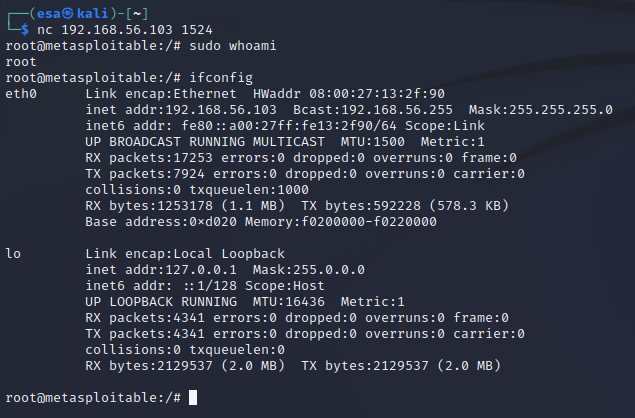
First I ran nmap on the port 1524 on the Metasploitable 2 IP address to scan it. There was a bindshell service running, which meant I could connect to a remote shell from my machine. Bindshell is simply a bash shell bind to a certain port that can be accessed from internet.

I connected to port 1524 on the Metasploitable 2 machine with netcat. The connection asked for no password or username, instead it just went directly in to the shell. Inside the shell I ran commands “sudo whoami” and “ifconfig” to see whether I actually had root and to see network adapter details of the machine.
j) Darn Low Security. Find Metasploitable 2 web server. Create a local account to DVWA Damn Vulnerable Web App. Set security “DVWA Security” to Low.
The Damn vulnerable web app was available at address “<metasploitable 2 ip address>/dvwa/”. I found it by connecting to my Metasploitable 2 IP address which provided a link to DVWA. The default login was provided, but no registration page. I tried accessing “…/dvwa/register.php” site but it did not exist. I logged in with the default admin credentials, but that did not help either as still no registration was found.
According to the earlier parts of this week’s assignment I already knew that there was a database running at port 3306. The nmap version scan revealed that it was a MySQL database. I decided to take a bold approach and try logging in with the default username “root” without a password. The command I used was
mysql -u root -h <metasploitableipaddress>
This decision was a smart one, as the database was open to anyone with the root user. I listed the databases with command “show databases” and saw that one of the databases was named “dvwa”. I connected to that database with command “use dvwa” and listed the tables with command “show tables”. The database had two tables, “guestbook” and “users”. “users” table seemed like an interesting one.
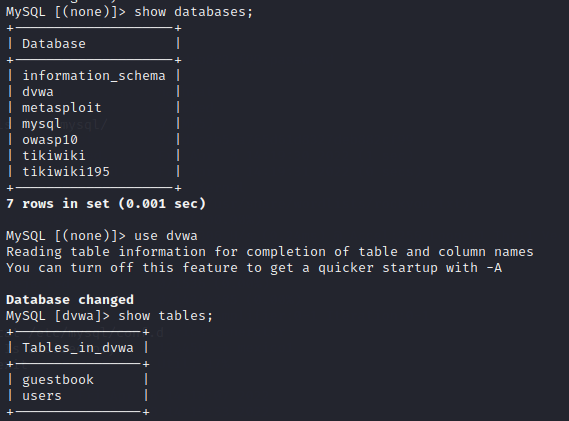
I ran a quick query to see what was inside the table. It seemed to be what I was looking for, as it contained the user ids, first and last names, usernames, passwords and avatar file paths.
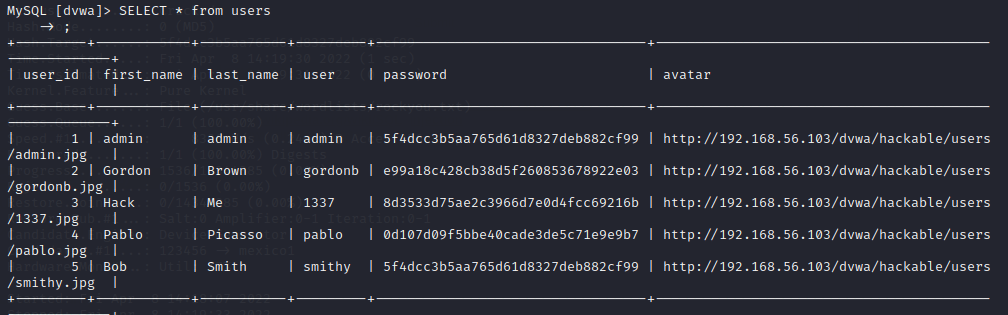
The passwords were encrypted, which is a good security practice. But looking at the passwords, admin and Bob Smith seemed to have the same passwords, which indicated that not-so-strong methods of encryption were used. Just for fun I logged in with Bob’s account by using the same password as admin and proved my point right.
I tried creating an account by copy-pasting the hash value to password field, but apparently the hashes were stored as objects of some sort as my password did not work. Next I had to figure out which encryption algorithm was used. I installed a tool called “name-that-hash” and ran the password hash through it. The result indicated that it was most likely hashed by using a raw MD5 algorithm.
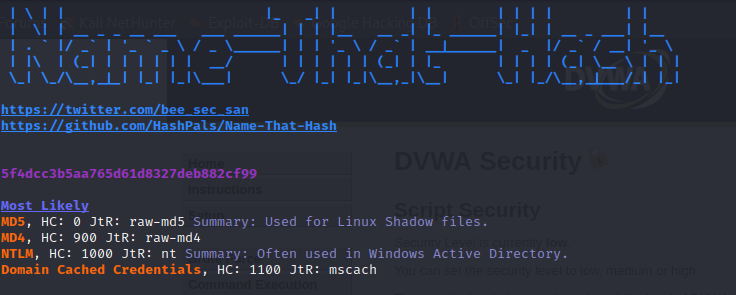
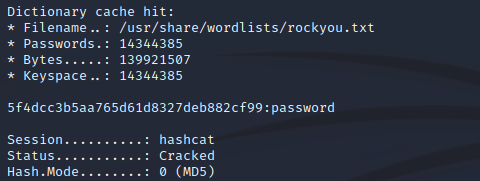
To confirm this, I used hashcat with a wordlist to crack the password. Name-that-hash provides useful information in the form of type (0) for hashcat . “-a” flag sets the attack mode to dictionary. I ran hashcat with command “hashcat -a 0 -m 0 5f4dcc3b5aa765d61d8327deb882cf99 /usr/share/wordlists/rockyou.txt”. A positive hit was found.
Following equally as bad security practises as the other users, I created myself a new user with the same password as the administrator and Bob. MqSQL has a built-in module for MD5 hashing which I used. The whole query I used to insert the data was
INSERT INTO users (user_id, first_name, last_name, user, password, avatar) VALUES (42, 'esa', 'kontio', 'notahacker', MD5('password'), null);
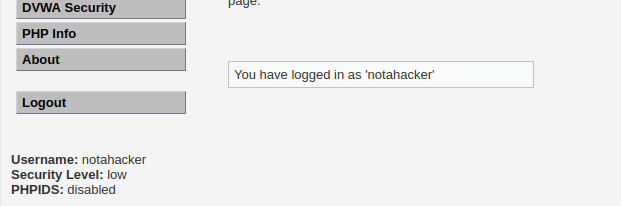
I logged out from the admin account and tried logging in with the new account. The login was successful and I had a new local user working. I set the security to “low”.
k) Execute! Solve DVWA “Command Execution”. (Best to have set “DVWA Security” to “Low”)
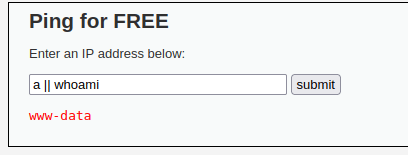
The dvwa security was set to low. I opened the command execution and read the help. The help page actually provided the solution to the level, as there was no input validation or filtering in use. Using “<ipaddress>;<commands>” was enough to remotely execute commands on the server. Instead of using “;”, also “&” and “||” work as dividers.
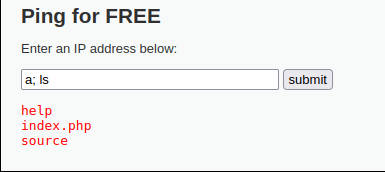
The medium level was a bit more difficult. Obviously the trick from last level was not working. I looked at the source code of the site, and from there I was able to see that now the “;” will be substituted with “” in the request. Only “&&” and “;” were substituted, but not the vertical bar used for piping. I ran a command using piping and it was a success.
The hard level proved to be too tough to crack. I am not sure if there is a way to remote execute commands as the data is sanitized and formatted very tightly. Non-numeric input is not allowed and the processed data must consist of 4 blocks of integers. If one of the characters is not an integer, the input is discarded as invalid. If the input exceeds the length of 4 blocks divided with periods, the input is discarded. I am assuming the hard level is there to show the proper way of handling user input?
z) Read and take notes
EDIT: This part was added 13.4.2022, after the initial deadline. I noticed I had missed one task and added it here on the mentioned day.
Article to read: https://owasp.org/Top10/A03_2021-Injection/
- Injections are usually caused by input that is not validated, filtered or sanitized properly.
- Can be avoided well by parameterizing the data and by using safe APIs and prepared statements.
- Client-side validation is not sufficient, server-side validation is a must.
- Injections used to be number one on the OWASP Top 10 list in the past, now in third place.
 Esa Kontio